How to Run Linux Docker Containers Natively on Mac with OrbStack?
Docker containers are widely used for developing, testing, and deploying applications in Linux environments. However, many developers work on Macs and still need an easy way to run Docker. Fortunately, there are great options available to run Docker containers natively on macOS.
Docker Desktop is the official app but uses lots of resources, Colima is fast and lightweight yet minimal, and UTM utilizes virtual machines that can be slow. A new alternative called **OrbStack -**combines the best of Docker Desktop with unparalleled speed, efficiency, and ease of use by taking a lightweight yet full-featured approach optimized for Mac.
What makes OrbStack stand out from the rest as a fast, simple, and capable way to run Docker?
Why Run Docker on a Mac?#
Reasons why developers want to run Docker containers on their Macs
1. Development environment consistency#
Eliminates differences between macOS and Linux environments when developing applications intended to run on Linux in production. This prevents unexpected issues from creeping in.
2. Faster testing#
Spin up disposable environments quickly without waiting for remote deployment. Rapidly iterate through build, test, and deploy cycles.
**3. Simpler deployment **#
Docker containers used in development can be deployed to production without changes, following the same containerization workflow.
**4. Replicating production **#
Containers mirror the Linux production environment more accurately compared to alternatives like VMs .
**5. Team workflow **#
Standardizing the dev environment with Docker facilitates collaboration. No need to replicate complex tooling on each team member’s machine.
**6. Portability **#
Docker containers can run unchanged on any platform with a Docker engine, providing consistency across macOS , Windows , and Linux .
Docker Desktop for Mac#
The officially supported way to run Docker on macOS
Docker Desktop includes the Docker engine, CLI , and Compose making it a one-stop solution for using Docker on a Mac.
Key Features:#
- Tight integration with macOS for native filesystem access and networking.
- Virtualization is made possible by the hypervisor framework, leading to better performance when compared to older methods.
- Secure access to host ports, user namespaces, and shared filesystems.
- Transparent switching between Linux and macOS containers with Docker contexts.
- Centralized management and security options.
- Built-in Kubernetes cluster.
- Extensions like Docker Scout for container inspection.

Colima#
A Fast and Light Docker Engine
Colima aims to provide a performant and battery-friendly way to run Docker containers on macOS by using lower-level virtualization APIs compared to Docker Desktop.
Key Features:#
- Very fast startup in under a second.
- Lower resource consumption.
- Supports Apple silicon and Intel Macs .
- Direct access to the host filesystem for volumes.
- Replacement for the Docker CLI and engine.

UTM#
Containers via QEMU/KVM
UTM ** (User mode emulation of Linux)** utilizes lightweight VMs powered by QEMU/KVM to run Docker containers and more. It supports Linux, Windows, and macOS guests with full virtualization.
Key Features:#
- Lightweight QEMU/KVM virtual machines.
- Linux, Windows, and macOS guests.
- Virtual networking and USB passthrough.
- Shared folders for host/guest integration.
- CLI access and remote management.
Introducing OrbStack#
The Best Docker Experience on Mac
The solutions covered so far highlight the compromises developers make when selecting how to run Docker on macOS. Existing options force a choice between resource usage, speed, compatibility, and ease of use. This is where OrbStack steps in - it raises the bar and delivers the best possible Docker experience on macOS without these tradeoffs.

OrbStack - Run VMs, Docker Containers & Kubernetes all in one place
Key Features:#

<b><strong>1. Native macOS app</strong></b>#
Uses AppKit for a responsive UI instead of Electron. Swift code and tight OS integration boost performance.

<b><strong>2. Lightning fast</strong></b>#
Optimized for speed. Starts in 2 seconds with no VM boot delay.

<b><strong>3. Light</strong></b> & <b><strong>Power </strong></b>Efficient#
Near-zero idle CPU usage and on-demand memory allocation improve efficiency. Much lower energy usage compared to running a whole VM.

<b><strong>4. Simple setup & 2-way file sharing</strong></b>#
Get started immediately with no complex configuration. Linux can access macOS files natively and vice-versa.

<b><strong>5. Network </strong></b>Integration#
Container domains, IPv6, VPNs, and more work seamlessly.

<b><strong>6. Linux VMs</strong></b>#
Create Debian, Ubuntu, Fedora, and other Linux machine VMs.

<b><strong>7. Docker Extras</strong></b>#
Host networking, bind mounts, domains, and container access.

<b><strong>8. Kubernetes support</strong></b>#
Run local clusters and access services from macOS.

<b><strong>9. Automation-friendly</strong></b>#
Manage OrbStack entirely through the CLI or GUI if desired.
OrbStack Architecture and Performance#
OrbStack is engineered for performance across the board. This starts with its Swift and native macOS codebase that avoids the overhead of solutions based on Electron or heavyweight VMs.
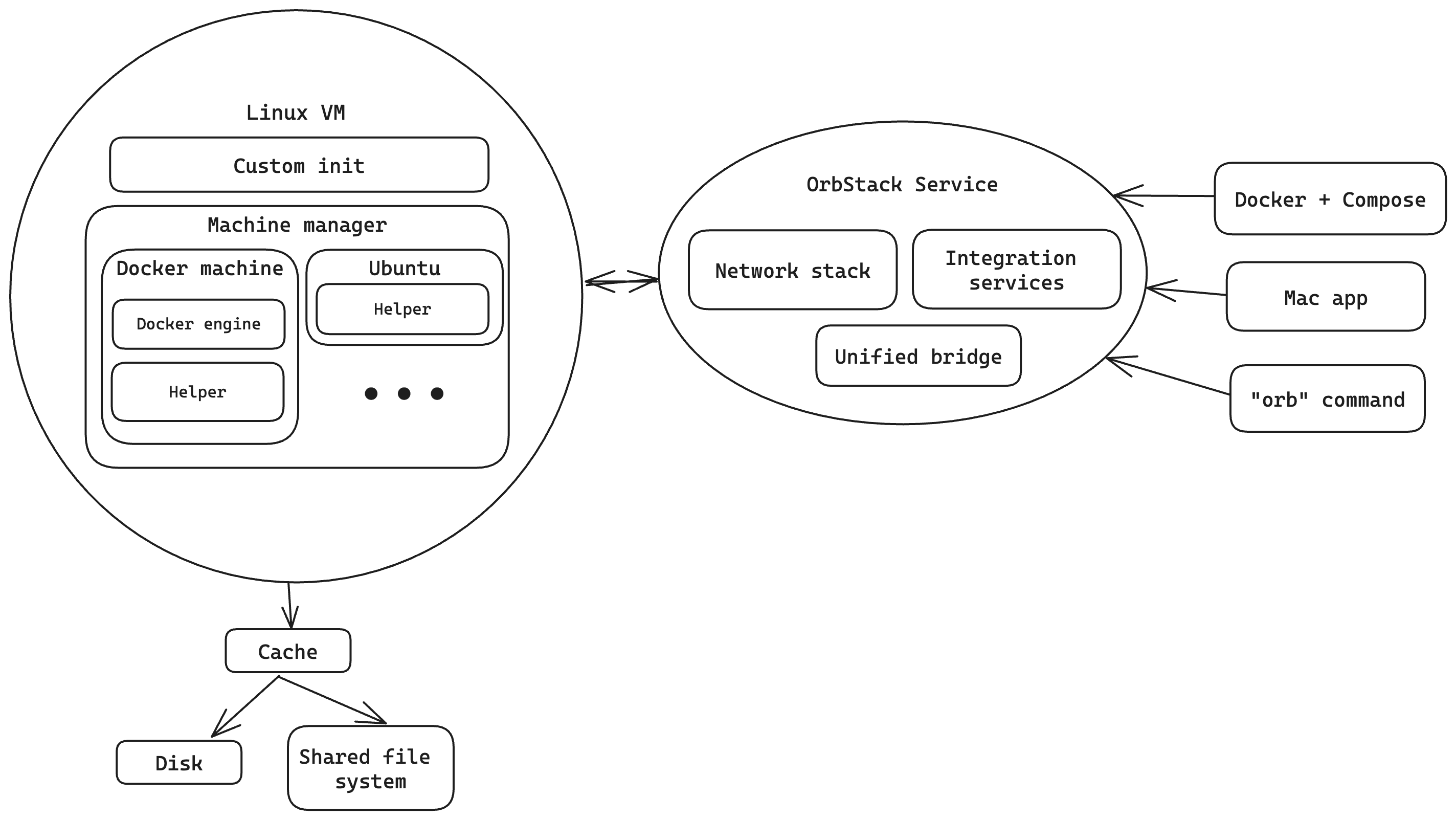
OrbStack, like WSL 2 (Windows Subsystem for Linux), uses a lightweight Linux virtual machine with a shared kernel to reduce overhead and save resources.
1. Swift Application#
The application frontend is built entirely in Swift , utilizing AppKit for optimal integration with macOS. This provides a smooth and responsive user interface. Swift’s speed and safety prevent performance issues and crashes.
2. Minimalist Linux VM#
Under the hood, a trimmed-down Linux VM runs only essential components like Docker and VPN services over a custom network stack . There is no GUI, window manager, or unneeded applications wasting resources.
This lightweight design allows an incredibly fast launch in under 2 seconds. The VM activates on-demand when needed and remains idle otherwise.
3. Optimized Network Stack#
Purpose-built networking utilizes the high-performance Netmap framework. This allows minimal latency and fast network speeds exceeding Docker Desktop benchmarks.
The network stack provides full access to Docker containers directly from macOS with IPv6, DNS, and VPN support.
4. Dynamic Resource Usage#
OrbStack allocates memory dynamically, only using what’s needed. This enables running 100s of containers in under 4GB of RAM whereas Docker Desktop would require 8GB or more. OrbStack’s CPU usage is at an idle state and near zero.
OrbStack delivers excellent performance without resource usage issues by minimizing overhead, unlike Docker Desktop.

Ease of Use#
OrbStack is designed to provide a seamless Docker experience on macOS with minimal configuration.
- The Setup Wizard guides you through installation and configuration in just a few clicks. Get up and running immediately without a complex setup.
- Automatic domain names remove the need to think about ports when accessing services. Just use the container name:
webapp.orb.local. - SSH ** keys** and environment variables are automatically forwarded to containers.
- File access works seamlessly in both directions between macOS and Linux.
- 2-way file sharing allows copying files between macOS and Linux visually or via the command line.
- CLI access is available through the standard Docker and docker-compose CLIs as you’d expect.
OrbStack makes working with Docker on macOS simple and intuitive. Next, let’s look at some of its power user features.

Advanced Features#
While designed for simplicity and ease of use, OrbStack includes several advanced configuration options and features.
1. Linux Virtual Machines#
In addition to Docker , OrbStack can run full Linux distributions like Ubuntu , Fedora, and more in lightweight VMs. This flexibility helps OrbStack replace tools like Parallels or VirtualBox.
Linux VMs include:
- Automatic networking - Access Linux services directly from macOS.
- SSH access - Easily connect to Linux VMs.
- Shared folders - Linux can access macOS files.
- Fast x86 emulation - Near-native performance when emulating Intel computers.
- CLI control - Easily create and manage VMs from the command line.
2. Kubernetes Support#
OrbStack makes it easy to run local Kubernetes clusters .
Features include:
- Simplified networking - Expose services directly via macOS DNS and IPs. No need for port forwarding.
- Automatic domain names like
myapp.localfor services. - Full access to pods and services from the macOS host.
- Single node cluster - Perfect for development and testing.
- ORB add-on - Managed configuration and installation of Kubernetes with a click.
3. Network Integration#
As highlighted earlier, OrbStack’s networking stack delivers seamless integration between macOS, Docker containers, and Linux VMs.
- VPN support - Containers work properly over VPNs.
- IPv6 networking - End-to-end IPv6 support.
- Fast performance - Optimized network engine built on Netmap.
- macOS proxying - Forwarding for HTTP, HTTPS , DNS, and more.
- Seamless experience - Containers and Linux VMs feel like part of the native macOS environment.
Should You Use OrbStack?#
Yes, OrbStack is an excellent choice for anyone who wants the best possible Docker experience on their Mac. Its winning combination of performance, efficiency, and usability makes OrbStack a perfect replacement for Docker Desktop and Colima.
Developers fed up with Docker Desktop’s resource usage and sluggishness should give OrbStack a try - they’ll be amazed by the difference. If you just need core Docker functionality, OrbStack won’t let you down. It’s advanced networking, Linux VMs, and Kubernetes support provide plenty of room to grow.
So if you’re looking to level up your Docker workflow on macOS, look no further than OrbStack!

FAQs (Frequently Asked Questions)#
How is OrbStack different from Docker Desktop?
OrbStack is an alternative to Docker Desktop engineered specifically for macOS. It delivers a faster, lighter, and simpler Docker experience thanks to its native Swift codebase, minimalist VM design, and optimized network stack.