What’s the Difference Between Git Clone and Git Fork ?
What’s the Difference Between Git Fork and Git Clone?#
Git is a popular distributed version control system that is used by developers all over the world. Git has become one of the most popular tools for developers. It allows multiple contributors to work on a project simultaneously while maintaining a complete history of changes.
Git allows developers to track changes made to their code over time, collaborate with other developers, and more. However, new developers who are just starting to learn Git may get confused between certain Git commands , like Git Fork and Git Clone. Although they share some similarities, but they are distinct concepts with separate objectives. The purpose of this article is to clarify the difference between them, as it is crucial for effective collaboration and repository management.
💾 What is Git Clone?#
Git ** Clone is a command refers to the process of creating a local copy of a Git repository. **When you run git clone, Git will create a new directory on your computer that contains a copy of all the files and folders in the Git repository. This copy will have the same commit history as the original repository, which means that you’ll be able to view all the previous versions of the code and the changes that were made to it.

What distinguishes a Git repository Clone from a Fork?
The primary purpose of Git Clone is to provide developers with a** local working environment where they can make changes, experiment, and contribute without affecting the original repository.**
🚀 When to Use Git Clone ?#
- Personal Development:
If you desire to work on a repository locally on your machine without contributing changes back to the original project, you can simply clone the repository. This allows you to possess a complete copy of the project’s history and work on it independently. - Collaboration with a Team:
The repository can be cloned by every team member onto their personal devices, where they are free to make modifications and then upload them to the remote repository for the rest of the team to view and include. - Offline Work:
Cloning a repository provides you with a local copy of the codebase, enabling you to work on the project even without an internet connection. Once you have internet access again, you can push the changes made locally to the remote repository and Experimenting with code modifications privately.
⚙️ How to ? Clone a Repository?#
To perform a Git Clone, you need the URL of the remote repository you want to clone.
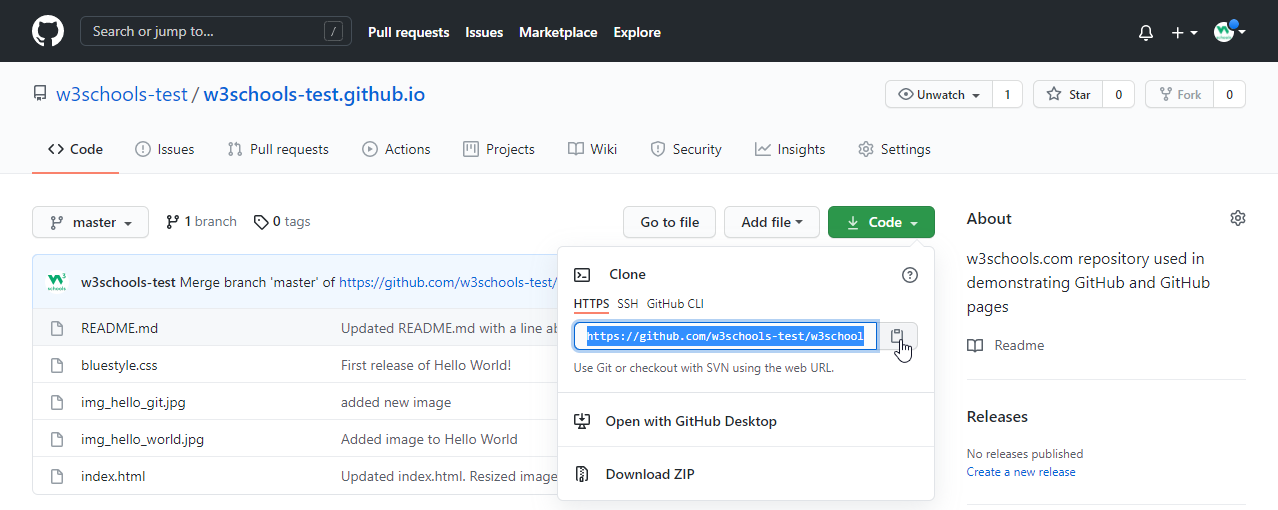
Github Project Repository URL | Image Credit: W3Schools
git clone https://github.com/example/example.git

git clone URL
Execute this command on your terminal , regardless of whether you are using Linux , Windows , or Mac .
By executing a simple command, Git will create a new directory on your local machine with the same content as the remote repository. This local copy is fully independent and allows you to work offline without requiring a constant connection to the remote repository.
Once you have cloned a repository, you can easily update your local copy with any new changes made in the remote repository. This process, called pulling, allows you to stay up to date with the latest code modifications made by other contributors.
🍴What is Git Fork?#
**Git Fork is a command that involves creating a personal copy of a repository on your GitHub account. **Git Fork gives importance to the idea of creating a independent and separate copy of the original repository that you can freely modify and contribute to without affecting the original project.
When you fork a repository, you’ll be able to see all the files and folders in the repository, as well as the commit history. You can also make changes to the code in the repository and create new branches and push those changes back to your forked repository.
The primary purpose of Git Fork is to facilitate collaboration and contribution to open-source projects. It enables developers to **experiment with modifications, fix bugs, or implement new features independently. **Once the changes are made, developers can propose them back to the original repository through a pull request, and the owner of the project can review your changes and merge them into the original repository.
🚀 When to Use Git Fork ?#
- Contributing to an Open-Source Project:
If you wish to contribute to an open-source project hosted on GitHub , forking allows you to create your own copy of the project . You can then make changes, experiment, and propose those modifications back to the original project by submitting a Pull Request. - Maintaining a Personal Version:
Forking a repository is useful when you want to create your own version of a specific project that requires extensive modifications or customization to suit your specific needs. This grants you an independent codebase that can be managed separately from the original project. - Building a Derivative Project:
Forking is advantageous when you intend to develop a new project based on an existing one. By forking, you can begin with an established codebase and modify it to create a distinct project while still maintaining a connection to the original project also Experimenting with code modifications publicly while maintaining a clear separation from the original project.
⚙️ How to ? Fork a Repository?#
You can fork the Git repository for the Git project, you would click on the “Fork” button on the GitHub page for the Git project.

Forking a Remote Repository on GitHub | Image Credit: faun.pub
- Go to the Project Repository you want to fork.
- Click on the “Fork” button in the top-right corner of the page.

The Difference Between Git Clone and Git Fork#

Working mechanism behind Git Clone & Forks
| 💾 Git Clone | 🍴 Git Fork | |
|---|---|---|
| 1 | Creates a local copy of the repository | Creates a separate copy of the repository |
| 2 | Independent of the original repository | Connected to the original repository through a fork |
| 3 | Read access to the repository | Read and write access to the forked repository |
| 4 | Pulls changes from the remote repository | Proposes changes back to the original repository |
| 5 | Individual development or small teams | Collaboration and contribution to open-source projects |
💡 Objective of each operation#
💾 Git Clone#
The main goal of Git Clone is to obtain a local copy of a repository for personal use. It allows developers to work independently without affecting the original project. It is useful for individual development or collaborating with a small team where everyone has direct write access to the original repository.
🍴 Git Fork#
Git Fork aims to encourage collaboration and contribution to open-source projects. It provides developers with a separate copy they can modify and propose changes back to the original repository. It is ideal for contributing to open-source projects or collaborating with a larger team.
🤝 Relationship with the original repository#
💾 Git Clone#
When you perform a Git Clone, the local copy is completely independent of the remote repository. Your local copy does not have a direct relationship with the original repository. However, you can still pull changes from the original repository to update your local copy.
🍴 Git Fork#
In contrast, Git Fork establishes a clear connection between the original repository and your forked copy. Your forked copy is linked to the original repository, enabling you to push changes to your forked repository and propose them back to the original repository through pull requests.
🔑 Access and permissions#
💾 Git Clone#
Git Clone grants developers read access to the entire repository. They can view, modify, and commit changes to their local copy. However, they may not have write access to the original repository, meaning they cannot directly push changes to it.
🍴 Git Fork#
On the other hand, Git Fork provides developers with both read and write access to their forked copy. They have full control over their forked repository, allowing them to freely push changes, create new branches, and propose changes back to the original repository.
👨👩👧👦 Collaboration and contribution#
💾 Git Clone#
Git Clone is primarily used for individual development or collaborating with a small team where everyone has direct write access to the original repository. It is suitable when you don’t intend to propose changes back to the original repository or work on an open-source project.
🍴 Git Fork#
Git Fork is ideal for contributing to open-source projects or collaborating with a larger team. It enables you to make changes in your forked copy, propose those changes back to the original repository through pull requests, and initiate discussions with other contributors.
97.8 KB
😎 Conclusion#
Git clone is used to make a copy of a Git repository on your own computer, while git fork is used to make a copy of a Git repository on your GitHub account . Both commands have their own uses and it’s important for developers to understand the differences between them when using Git to manage their code.
Forking and Cloning have different purposes:
Forking is often used in collaborative development when you want to create a separate copy of a repository to suggest changes to the original project.
On the other hand, cloning is done to create a local copy of a repository on your computer. This allows you to work independently, make your own changes, and avoid directly affecting the original repository or hindering collaboration with others.